Text Repeater Tool:Repeat Any Word, Sentence, or Emoji Instantly
If you've ever needed to send the same word or phrase over and over on WhatsApp, fill a form field for testing, or create a repeated pattern of emojis for a post, you've probably run into the same annoying problem: copying and pasting the same text again and again wastes time and gets messy fast.
I ran into this myself while testing input fields on NexoText. I needed long strings of repeated text to check how forms and text areas behaved with heavy input, and manually pasting the same word fifty times got old within a minute.
That's the exact problem a text repeater solves. Instead of copying and pasting manually, you type your text once, choose how many times it should repeat, and the tool generates the full output instantly.
That's also why I built the NexoText Text Repeater — a free, browser-based tool that repeats any word, sentence, or emoji as many times as you need, with a custom separator between each repetition.
In this guide, you'll learn what a text repeater is, when people actually use one, how to use the NexoText tool step-by-step, and a few mistakes worth avoiding.
Table of Contents
Quick Answer
A text repeater is a free online tool that duplicates any word, sentence, or emoji as many times as you choose, joined together with a separator such as a space, comma, or line break.
It's commonly used for messaging apps like WhatsApp and Discord, social media posts, creative text patterns, and testing forms or input fields during development.
What Is a Text Repeater?
A text repeater is an online utility that automatically duplicates words, sentences, emojis, or entire paragraphs multiple times.
Instead of manually copying and pasting the same content again and again, the tool instantly generates the repeated text based on the number of repetitions you choose.
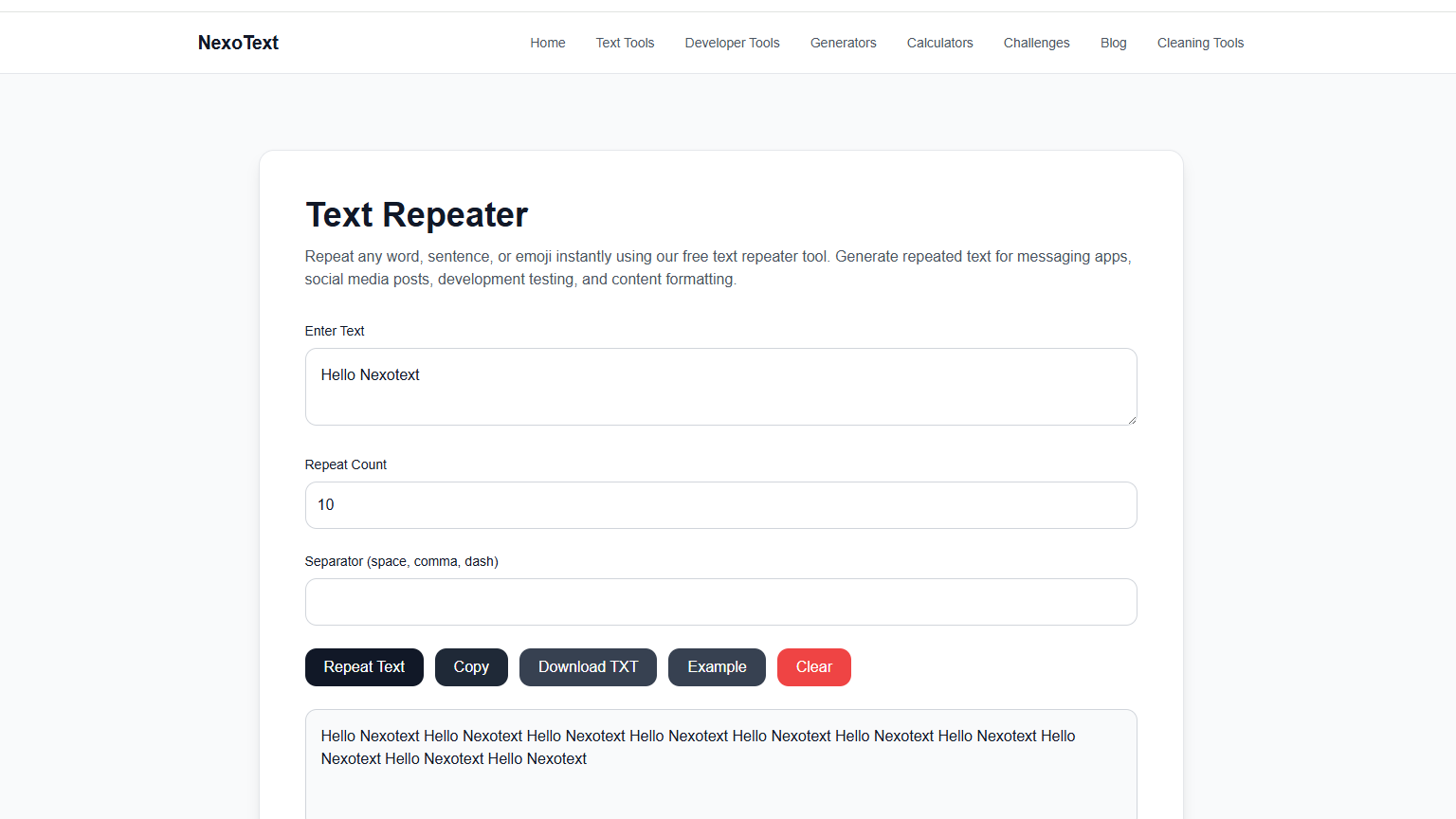
You type your text once, set how many times it should repeat, pick a separator, and the tool builds the full output for you in a single click.
A Simple Example
Input: "Hello"
Repeat count: 5
Output: Hello Hello Hello Hello Hello
The tool works entirely in your browser, so nothing is uploaded or stored anywhere. You get instant, repeated text you can copy or download right away.
Why People Use Text Repeaters
At first glance, repeating text sounds like a small, unusual need. In practice, it comes up in more everyday situations than most people expect.
Common Reasons People Repeat Text
- Sending playful, repeated messages on WhatsApp or Discord.
- Creating repeated emoji patterns for social media captions.
- Generating placeholder text to test website layouts.
- Testing forms, character limits, and input fields during development.
- Creating spammy-looking test data for QA and debugging.
Doing any of this manually means clicking copy and paste dozens or hundreds of times. A text repeater turns that into a single step.
How to Use the Text Repeater (Step by Step)
The NexoText Text Repeater is designed to be simple enough for anyone to use in a few seconds.
Enter Your Text
Type or paste the word, sentence, or emoji you want to repeat into the input box.
Set the Repeat Count
Choose how many times the text should repeat. The tool caps extremely large values so the page stays fast for everyone.
Choose a Separator
Add a space, comma, dash, or any custom separator between each repetition to control how the output is formatted.
Generate, Copy, or Download
Click "Repeat Text" to generate the result, then copy it instantly or download it as a plain text file.
Before & After Examples
Here's how a few common inputs look once they've been run through the text repeater.
Happy Birthday
Happy Birthday, Happy Birthday, Happy Birthday
| Input | Repeat Count | Output |
|---|---|---|
| 🔥 | 5 | 🔥🔥🔥🔥🔥 |
| Test | 4 | Test-Test-Test-Test |
| Congrats! | 3 | Congrats! Congrats! Congrats! |
Where Repeated Text Works Best
Repeated text is most useful on platforms built around casual, fast messaging and visual content.
Developers and designers also use repeated text outside of social platforms, mainly to test how an interface behaves with long or repeated strings of input.
Repeating Text for Captions and Content Creation
Beyond messaging apps, repeated text shows up a lot in content creation. Scroll through Instagram or TikTok and you'll spot captions built around a repeated word or emoji for emphasis, like a string of fire emojis under a photo or a word stretched across a caption for comedic effect.
Creators also use repetition to make comments and captions stand out in a crowded feed. A single "wow" gets scrolled past. Five "wow"s in a row tends to grab a second look, whether that's the goal or not.
Repetition also comes up in comment sections and fan pages, where the same phrase or emoji gets repeated to show enthusiasm or to keep a joke going in a thread. Typing it out by hand every time is tedious, especially on mobile.
If you manage a page or post regularly, having a way to generate this kind of repeated text in seconds saves a genuinely annoying bit of manual typing, especially across multiple posts or replies in a day.
The same tool works for creating pattern-style text for bios, spacing out characters for visual effect, or filling a caption with repeated words to hit character minimums some platforms use for engagement.
Common Mistakes to Avoid
Repeating text is simple, but a few small habits can make the output harder to use than it needs to be.
Mistakes to Avoid
- ❌ Repeating text an extreme number of times. Going from 10 repeats to 10,000 might feel like a fun stress test, but most browsers start to lag once the output gets that long. If you're testing an input field, a few hundred repeats is usually enough to see how it behaves.
- ❌ Skipping the separator. Without a space, comma, or line break between repeats, everything runs together into one unreadable block. It's an easy step to forget, but it's the difference between a clean result and a wall of text nobody can read.
- ❌ Ignoring platform character limits. Some chat apps and SMS cap how much text you can send in one message. Repeat a sentence fifty times and paste it into a text message, and it might get cut off or split into several messages.
- ❌ Using it in professional messages. Repeated text works well in casual chats between friends. Sent to a coworker or client, the same trick can come across as spammy. Save it for group chats and social posts, not work emails.
- ❌ Not previewing before sending. Always glance at the output before copying it. It only takes a second, and it catches typos or separator mistakes before they end up somewhere you can't easily edit.
Best Practices
- Keep repeat counts reasonable for the platform. A WhatsApp message with 10 repeats reads as playful. The same message with 500 repeats just looks broken on someone else's screen.
- Use a clear separator. A space or comma keeps the output easy to scan. Skipping it turns even a short phrase into something hard to read at a glance.
- Preview before you send or publish. A quick look at the generated text catches mistakes before they're locked into a message or post.
- Use the download option for larger outputs. If you're generating repeated text for testing or a bigger project, saving it as a file is easier to manage than copying long text by hand.
- Match the tone to the setting. Playful, heavily repeated text fits casual chats and captions. Keep it out of formal writing or client communication.
Who Should Use This Tool
Related Resources
Text Repeater Tool
Repeat any word, sentence, or emoji instantly.
Text Tools Hub
Explore all free NexoText writing and editing tools.
NexoText Blog
Read more writing guides and tutorials.
Frequently Asked Questions
Here are the most common questions people ask about text repeaters and how to use them.
What is a text repeater?
A text repeater is an online tool that duplicates a word, sentence, emoji, or paragraph multiple times automatically, instead of manually copying and pasting the same text over and over.
How do I repeat text on WhatsApp?
Type or paste your text into a text repeater tool, choose how many times you want it repeated, generate the result, then copy and paste it directly into your WhatsApp chat.
Can I repeat emojis with a text repeater?
Yes. Most text repeater tools support Unicode characters, so you can repeat emojis and symbols the same way you repeat regular words or sentences.
Is there a limit to how many times I can repeat text?
Most tools allow very high repeat counts, but extremely large values can slow down your browser. A sensible upper limit keeps the tool fast and reliable for everyone.
Can I repeat text with numbering?
Not directly inside the tool right now. You can add numbers manually before pasting your text in, or use a line break as your separator and number the lines yourself in the output.
Does repeating text affect SEO or get flagged as spam?
Repeated text used in personal messages or captions has no effect on SEO since it isn't indexed content. On messaging platforms, sending excessive repeated text to someone who hasn't asked for it can get flagged or reported, so it's best kept to casual, mutual conversations.
Is the NexoText text repeater free to use?
Yes. The NexoText Text Repeater is completely free, runs directly in your browser, and does not require any signup or installation.
Final Thoughts
Repeating text manually is one of those small tasks that feels harmless until you actually have to do it fifty or a hundred times in a row.
A text repeater turns that repetitive work into a single step: type it once, set your count and separator, and let the tool handle the rest.
Whether you're sending a playful message, filling a layout with placeholder content, or stress-testing an input field, the right repeat count and separator make the output ready to use immediately.
If you need to repeat words, sentences, or emojis quickly, try the NexoText Text Repeater and copy or download your result in seconds.
Ready to Repeat Your Text?
Repeat any word, sentence, or emoji instantly. Free, browser-based, and ready in seconds — no signup required.
Try the Text Repeater →